Ri-BIT allows you to create custom default filters. This is useful if you only work with specific categories or markets and when you log into your dashboard, you want to see those data points right away, rather than adding a filter each time you visit the dashboard.
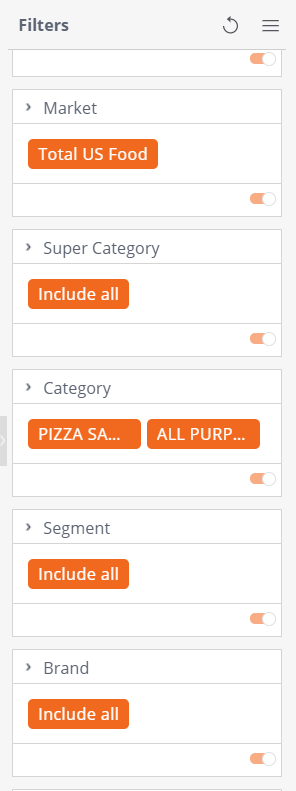
First, set the filters you wish to see every time you arrive on your dashboard. For example, in the screenshot below, I only want to see the Total US Food Market and the Pizza Sauce and All Purpose Baking Mix categories.
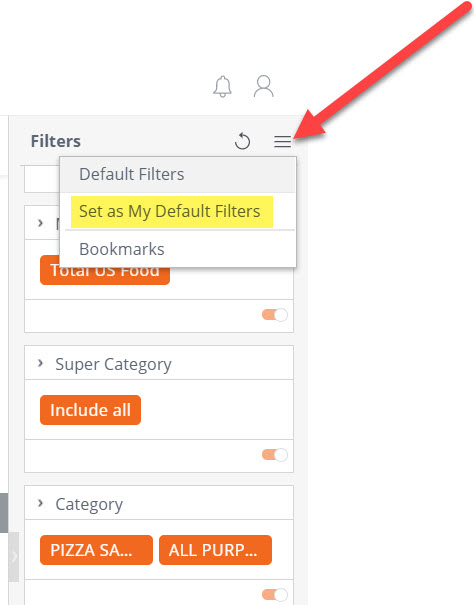
Once you've set your filters, click the three lines at the top right corner of your filter panel. You will have the option to set as your default filters. This means every time I log into my dashboard, even if I log out an log back in, my dashboard will automatically filter on the Total US Food market and my Pizza Sauce and All Purpose Baking Mix categories.
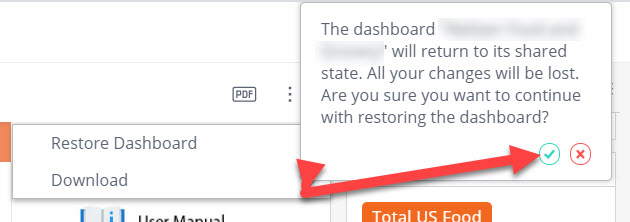
If, at any time, you decide you no longer want your custom filters, you have the ability to restore your dashboard back to its original state. To do this, click the three dots next to the PDF icon in the top right corner of your dashboard, then click Restore Dashboard. A pop-up box will ask if you're sure you want to restore, click the green check mark.